
Storyboard
Paste a script. Get a drawn storyboard you can play.
You need: An AI brain for the assistant, and an engine. It is free on your own computer.
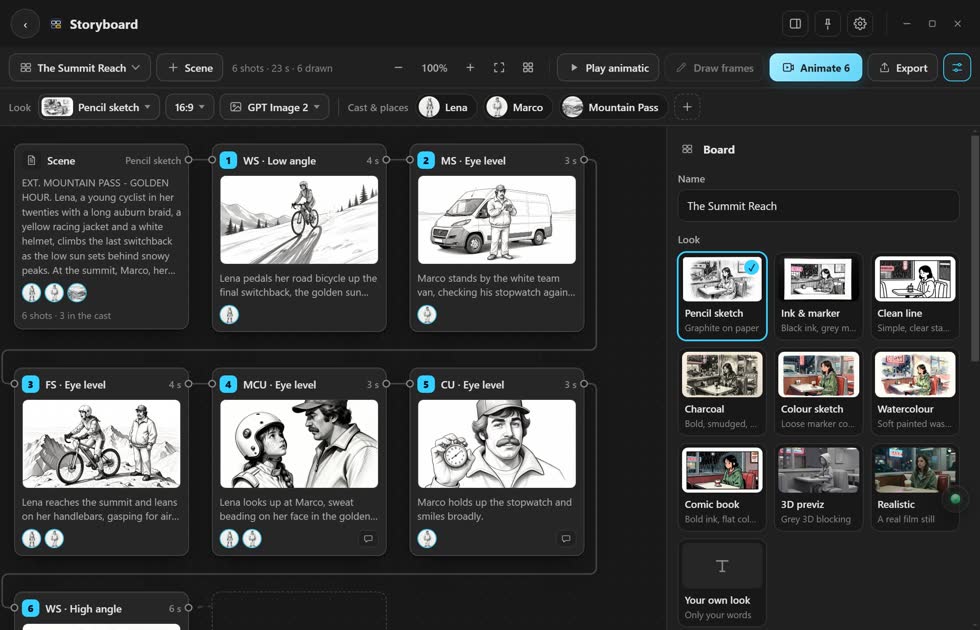
Make a board
- Paste your scene. A script, a description, or one shot on each line.
- Press Break into shots. Your AI plans the shots and lists the people and places.
- Pick a look. Sketch, ink, comic, 3D previz or Realistic.
- Press Draw frames. Each picture lands on its card.
- Press Play. You see the board shot by shot.
More you can do
- Keep the same faces
- Give a person or place a picture. Every frame is drawn from it.
- Change a frame
- Redraw makes a new one. Change… lets you say what to fix.
- Animate
- Turns a frame into a clip.
- Send it out
- To your timeline, a bin, a PDF, or the shot list as text.
Stuck? Press the round button at the bottom right of the app and ask the assistant. It knows every screen. Or ask other editors in The VFX Room.