
Sound Design
Make sound effects, voices and music for your video.
Watch it in the app
Make a sound
- Open Sound Design. Tap it on the home screen.
- Pick a lane. A lane is one kind of sound, like Music or Voice-over.
- Say what you want. For example “rain on a tin roof”.
- Press Generate. Then send it to your timeline.
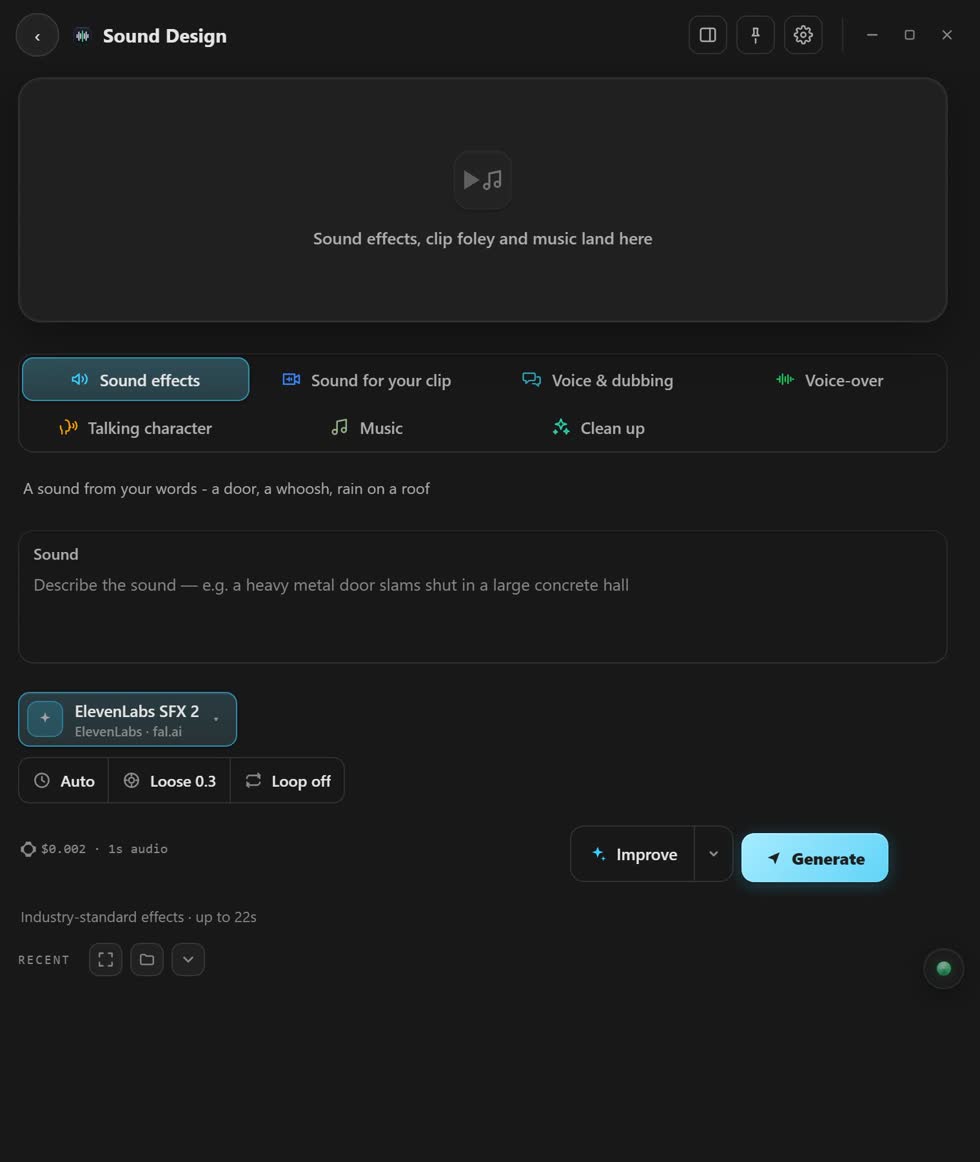
The seven lanes
- Sound effects
- Any sound you can describe. On fal.ai and ComfyUI.
- Sound for your clip
- Sound made to fit a clip. On fal.ai.
- Voice & dubbing
- A clip in another language. On fal.ai.
- Voice-over
- Your words, read out loud. On fal.ai.
- Talking character
- A picture that speaks. On fal.ai and Comfy Cloud.
- Music
- Songs and background music. On fal.ai and ComfyUI.
- Clean up
- Removes noise from a voice. On fal.ai.
Make a picture talk
- Pick a picture of your character.
- Pick the voice. Use your own voice-over. Or on fal.ai, type the words and pick a voice.
- Press Make it talk.
Stuck? Press the round button at the bottom right of the app and ask the assistant. It knows every screen. Or ask other editors in The VFX Room.