
Render on your computer
Make pictures and videos on your own graphics card. Free, and no limit.
You need: A graphics card with at least 8 GB of memory, or an Apple Silicon Mac.
Set it up once
- Get ComfyUI. It is the free program that runs the models. Download it from comfy.org and install it.
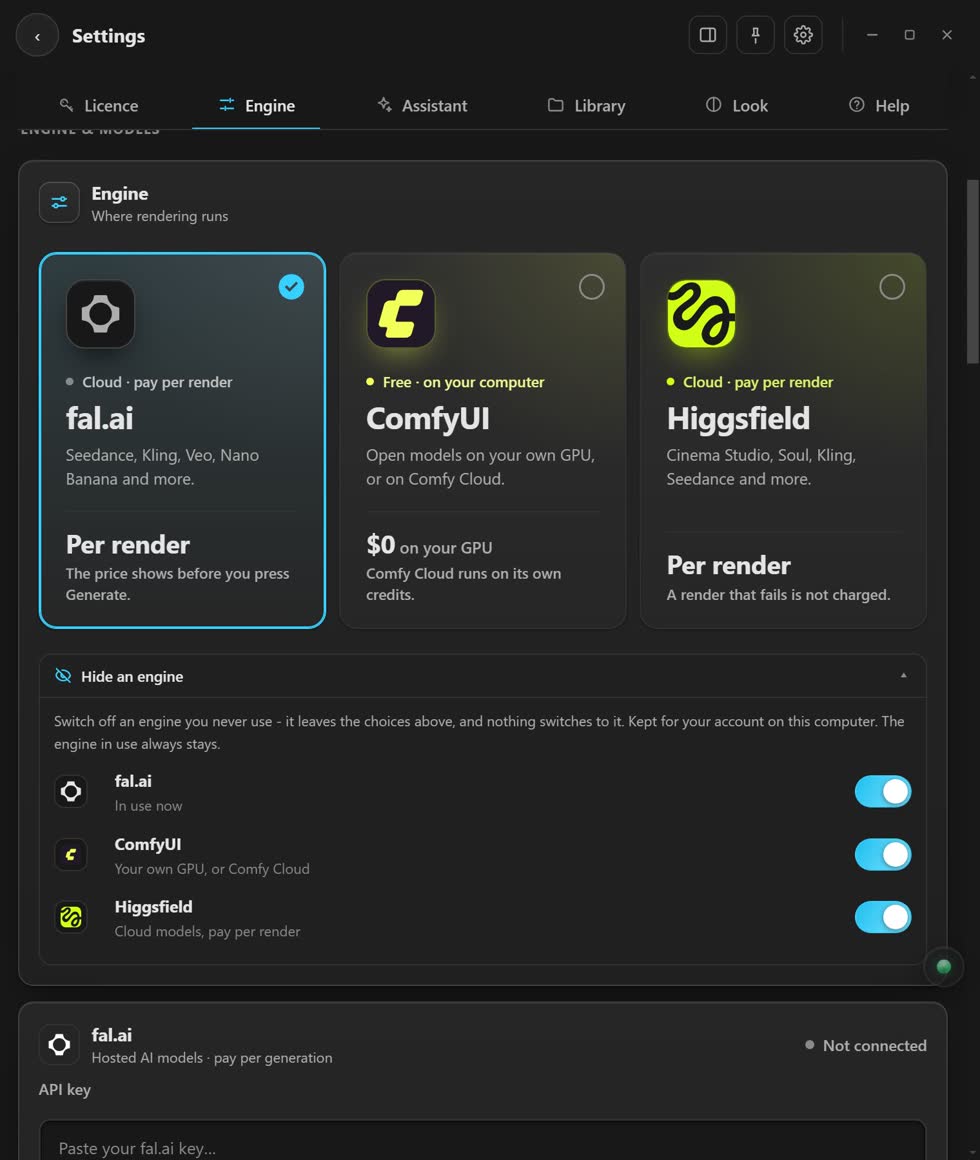
- Open Settings ▸ Engine. Pick ComfyUI.
- Pick This computer. The app finds ComfyUI and can start it for you.
- Download a model. Settings ▸ Local models shows how much memory each one needs.
- Press Generate. It costs nothing.
What can my card run?
- 8 GB
- SDXL, Z-Image Turbo, Wan 2.2 5B video at 720p, and Storyboard frames.
- 16 GB or more
- FLUX Klein, Qwen-Image at full speed, LTX 2.3 at 1080p.
No strong graphics card?
Switch to Comfy Cloud in the same place. You get the same open models with nothing to download, paid in credits. Or use fal.ai or Higgsfield and pay per result.
If it does not work
- ComfyUI did not answer
- Start ComfyUI yourself, then press Test connection.
- It cannot find the files
- Press Link to ComfyUI in Settings ▸ Local models.
- Out of memory
- Pick 480p, make the clip shorter, or switch to Comfy Cloud.
Stuck? Press the round button at the bottom right of the app and ask the assistant. It knows every screen. Or ask other editors in The VFX Room.